V Store: Private Files, Printable Models and a Stable iPhone Viewer
How a team of five built V Store, an Arabic-first 3D model marketplace with a browser converter, print-on-demand and a vendor portal, across four Next.js apps.
- Next.js
- React 19
- TypeScript
- PostgreSQL
- Prisma
- AWS S3
- Redis
- BullMQ
- Three.js
- Cloudflare Workers
TL;DR: V Store is a marketplace where creators sell 3D models and buyers can view, convert and order them as physical prints. As engineering manager, I led a team of five that built it as four apps in Arabic, English and Japanese. Before launch, we closed a hole that let anyone download paid files, made web-only models printable, and fixed the memory leak that made iPhones reload the page.
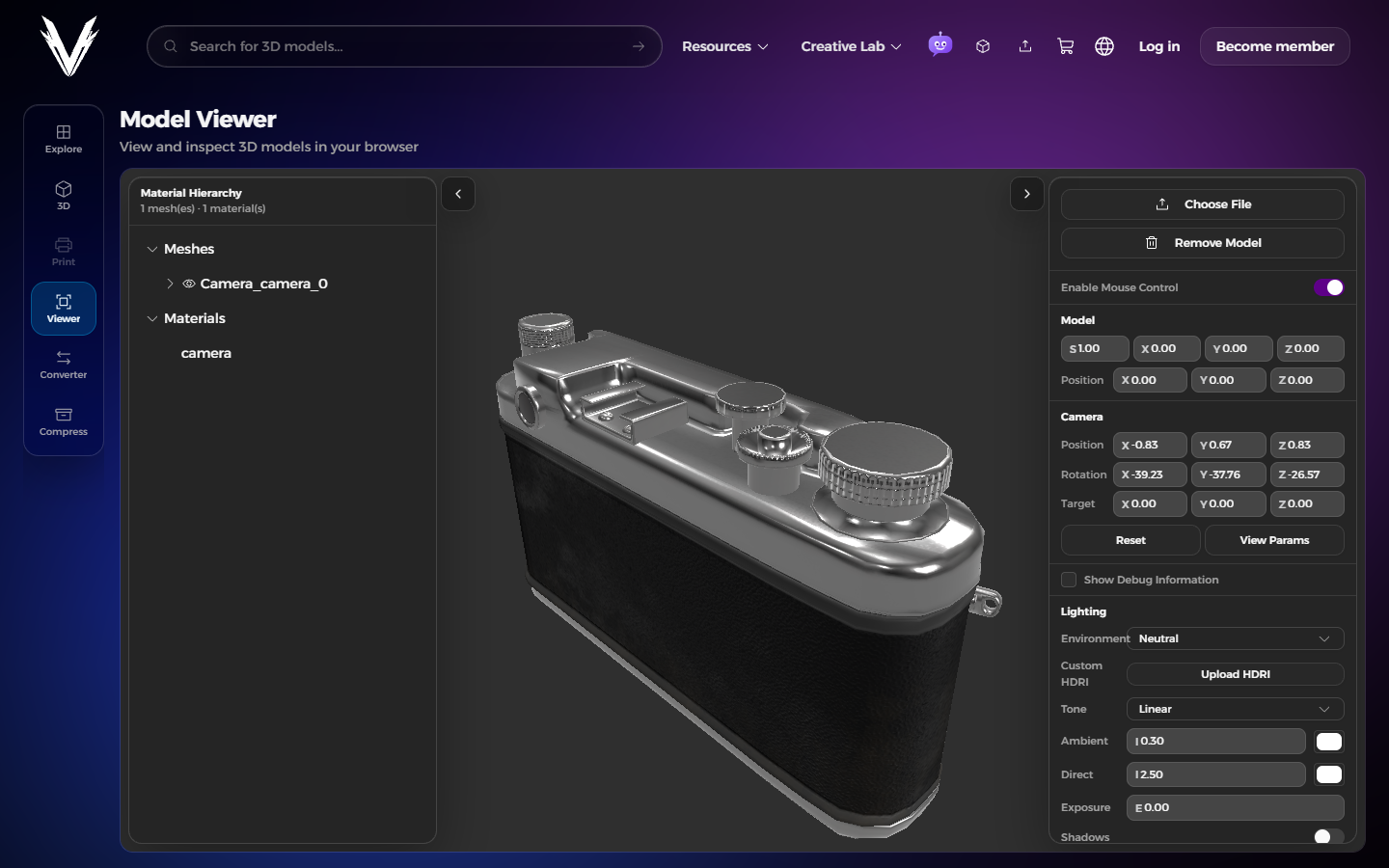
Overview
V Store is built for buyers in Saudi Arabia first. Arabic is the default language, payments go through Moyasar, and orders ship through OTO. A buyer can rotate a model in the browser, buy a licence, convert the file to another format, or send it to a print vendor and get a physical object delivered.
My role: engineering manager for a team of five. I set the technical direction across the four apps, made the architecture calls described below with the team, and owned launch readiness. V Store is now live at vstore.sa. This case study covers the build up to launch.
| App | What it does |
|---|---|
vstore-web |
Public storefront: search, 3D viewer, cart, checkout, creator profiles, AI tools |
vstore-admin |
Backend API and staff admin: Prisma + PostgreSQL, S3, Redis/BullMQ workers |
vvendor |
Portal for print vendors: quotes, orders, production, quality checks |
vstore-docs |
Help centre in three languages, with screenshots generated by Playwright |
The challenge
A 3D marketplace looks like an image store with a spinning preview. Four problems made it harder than that.
1. Paid files were public. Original model files sat in the same public S3 folder as thumbnails and previews. Anyone who learned a file's URL could download a paid model without buying it. In a store that sells files, that undercuts every sale.
2. Marketplace files could not be printed. The store keeps models as GLB, the format browsers render best. Print networks do not accept it. Slant3D, one of the print partners, rejects the upload outright with Invalid type glb: File Type Must be stl step stp 3mf obj. So "order a print" failed for every model that only had a GLB file.
3. iPhones reloaded the page. Our CEO caught this one: on iOS Safari, browsing a few product pages made the tab reload by itself. The cause was memory: each 3D viewer loaded geometry, textures and hover sprites, and nothing released them when the user left the page. iOS kills the tab when it runs out of memory, so the user lost their place.
4. Data lived in two places. The storefront started on Firebase (Auth, Firestore, Storage) while the backend grew on PostgreSQL. Users, models and orders had two possible sources of truth.
None of these show up in a demo. A buyer would hit each one in normal use.
The strategy
We used one rule for every decision: the backend owns the truth, and the browser does the heavy work only when it is cheaper there.
Decision 1: One backend, no Firebase in the storefront
We moved storefront authentication and business data behind the vstore-admin REST API. Registration, login, Google sign-in and email verification all go through it. The old Firebase auth functions were left in place but now throw an error that points to the backend, so any missed call fails loudly instead of writing to the wrong database.
Trade-off: one more network hop for the storefront. In return, permissions, prices and licences are checked in one place.
Not finished yet: the vendor portal still uses Firebase. Moving it to the same backend is the next step.
Decision 2: Private originals with signed URLs, rolled out in a safe order
Originals moved under a private/ S3 prefix. Previews, thumbnails, sprites and HDR environments stayed public. The API now signs a short-lived URL only for someone allowed to have the file: 5 minutes for the download endpoint, 10 minutes for server-side fetches, 6 hours inside API responses.
I set the rollout order. A signed URL also works for a public object, so we shipped the signing code first, migrated old files second, and changed the bucket policy last. Each step could be rolled back on its own, and existing download links kept working throughout.
Decision 3: Replace the Blender pipeline with a paid remesh step
The first attempt at printable files was a self-hosted pipeline: an SQS queue feeding Blender workers that repaired the mesh and exported STL and 3MF. It was built and documented, but it needed its own servers, IAM roles, a dead-letter queue and 15-minute job timeouts. Our CTO made the call to disable it, and my team built the replacement.
The replacement uses Meshy's remesh API. When a buyer asks an international vendor for a quote and the model has no sliceable file, the API answers PRINT_REPAIR_REQUIRED. The storefront offers "Prepare for printing (8 tokens)". The backend debits the buyer's token wallet, starts the remesh, polls it, rescales the result and stores the STL in S3. If the job fails, the tokens are refunded. The quote then retries by itself and shows a live price.
Trade-off: each repair costs money. Charging it to the buyer's tokens made the cost visible, and the store no longer has to run its own repair workers and queue.
Decision 4: Treat mobile memory as a budget
On iOS the goal was to use less memory per page:
- Every Three.js geometry, material, texture and animation mixer is disposed when the viewer unmounts, and the loader caches are cleared.
- Hover sprites (the animated previews on product cards) are off on mobile. Phones get a still thumbnail.
- The WebGL renderer on iOS uses default power mode, no antialiasing, no shadows and a pixel ratio capped at 2.
Implementation
Five engineers worked across the four apps. The main pieces, in the order they mattered:
- Backend first.
vstore-admingrew into the single API: 87 Prisma models and about 310 route handlers covering catalogue, licences, orders, billing, printing, shipping and vendors. Long jobs (model uploads, billing rollover, AI generation status, print job offers) run as BullMQ workers on Redis. - Upload and optimisation. Uploads go to a short-lived staging prefix, then get copied, compressed for the viewer and stored. The file signature is checked before anything is trusted.
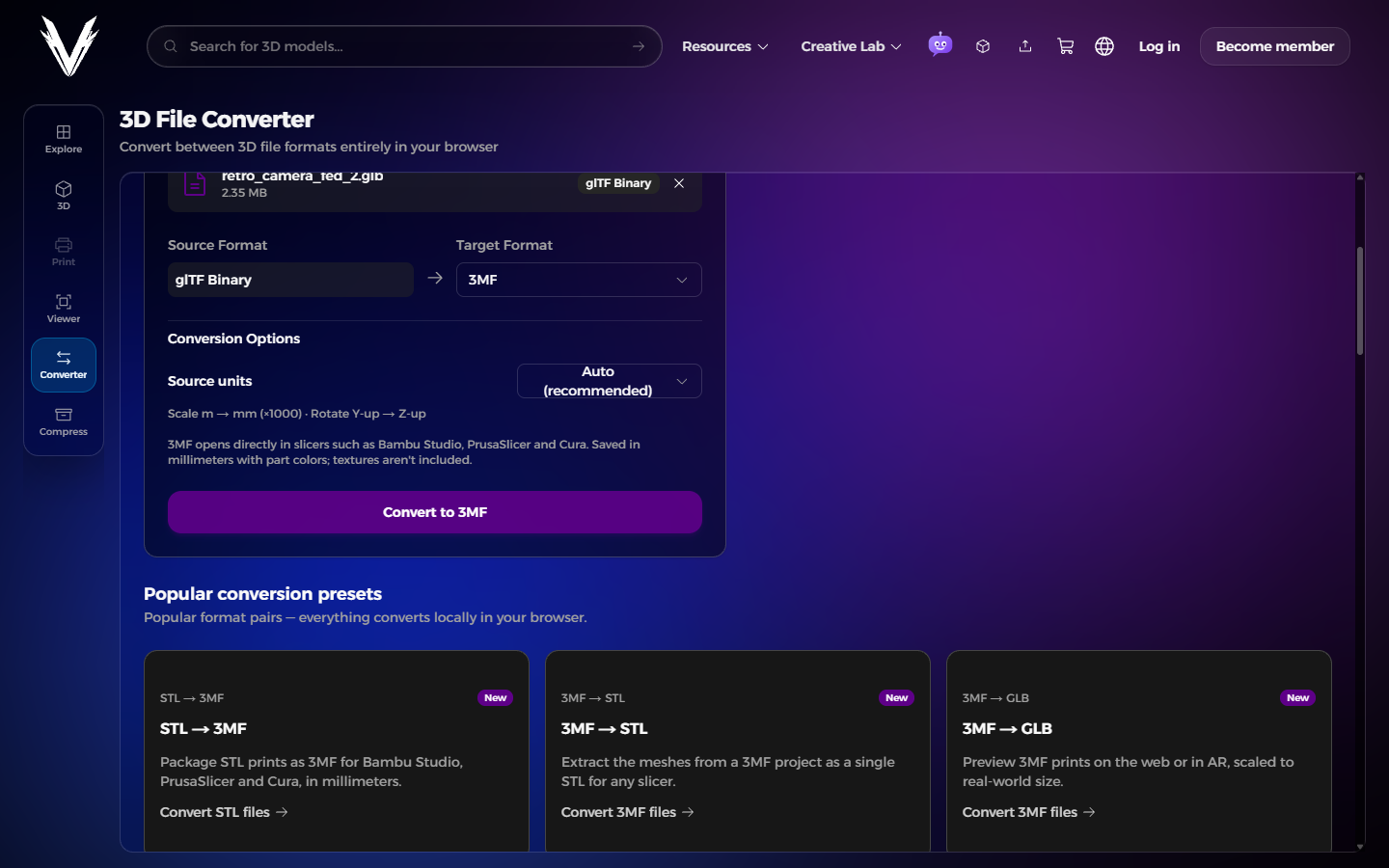
- A converter that runs in the browser. Buyers can convert between GLB, glTF, FBX, OBJ, STL, PLY, DAE, 3MF and USDZ. It handles units and axes too: a GLB in metres becomes a 3MF in millimetres with Z pointing up, ready for Bambu Studio, PrusaSlicer or Cura. Conversion runs in a Web Worker so the page stays responsive, with a main-thread fallback for formats that need the DOM. Doing this client-side uses no server compute per conversion.
- Printing and shipping. Vendor quotes, the print-repair step above, QC checklists, auto-routing of jobs to vendors, and OTO shipping labels and tracking.
- Billing without recurring charges. There is no saved-card renewal yet, so a paid plan must never extend for free. A rollover worker closes ended plans, moves users to the Free plan, grants that month's free tokens once and sends a notice. Purchased tokens are never touched.
- Edge deployment. The storefront, vendor portal and docs deploy to Cloudflare Workers with the OpenNext adapter. Workers limit static files to 25 MiB, so large HDR environments and video moved to R2 and Next.js redirects to them.
The risky first run: the first run of the billing rollover. Because no plan had ever been closed, the first scan would downgrade every user whose paid period had already ended, including accounts the billing page still showed as "Renews on…". Our CTO wrote that up before the job was switched on, so the downgrade was a planned event, not a surprise.
How I ran the team
Five engineers, four apps and three languages leave a lot of room for things to drift. My job was to keep them consistent and to keep a current list of what would break on launch day.
- Quality gates on every commit. In the storefront, every commit runs Prettier, ESLint and a full TypeScript typecheck, and every push runs the unit tests. A separate script checks that every translation key exists in Arabic, English and Japanese, so a missing string can be caught before it ships as a raw key.
- A QA plan sized to the product. Before launch we wrote about 2,100 manual test cases across the storefront and vendor portal, ranked P0 to P3. The 232 P0 cases cover money and sign-in. The first full pass: 1,079 passed, 5 failed, 712 were blocked, and the other 330 were skipped or marked for retest. The 5 failures went straight to the bug list, and the blocked cases became the to-do list for launch.
- Docs that cannot go stale. The help centre's screenshots come from Playwright tests, in all three languages. When the UI changes, re-running the tests refreshes the docs.
Where it stands
V Store is now live. This case study does not report traffic or revenue numbers. What it can show is the launch risks that were closed beforehand:
| Risk | Before | Now |
|---|---|---|
| Paid originals reachable by public URL | All of them | None (signed URLs only) |
| Models printable by STL-only vendors | GLB files rejected | Any model whose 8-token repair succeeds (tokens refunded if it fails) |
| iOS tab reloads while browsing | Reproducible after a few product pages | Viewer resources released on every page change |
| Places where user data lives (storefront) | Firebase and PostgreSQL | PostgreSQL only |
The test suite has 124 test files, from unit tests on pricing, QC transitions and billing to Playwright end-to-end tests, and they all pass.
What I learned
1. Look for a change that works with both the old and new setup. Signed URLs work on public objects too, which turned a risky permissions change into a series of small, reversible steps.
2. A paid API can be the better choice than a more flexible pipeline. The Blender pipeline could do more than the Meshy remesh, but it needed servers, queues and maintenance. For a team of five, a metered API with refunds on failure was easier to run.
3. On iOS, release memory before you tune rendering. The fix came from disposing resources and showing less on small screens, not from renderer settings alone.
4. Plan the first run of any job that touches money. Background jobs that change plans behave differently the first time. Writing that run down in advance avoided surprise downgrades.
FAQ
Why four apps instead of one?
Buyers, staff and print vendors have different permissions and release schedules. Separate apps keep vendor and admin code out of the public bundle. The cost is shared code, such as the 3D converter, which now has to be ported between apps by hand.
What would you do differently?
Two things. First, I would put every app on the single backend from day one. The storefront migration off Firebase took real effort, and the vendor portal still has to make the same move, so we will pay that cost twice. Second, I would make the 3D converter a shared package early. The storefront's copy has moved well ahead of the admin's, and the old copy-between-apps script would now overwrite that work.
Can I see it?
Yes. V Store is live at vstore.sa. The model viewer and the converter shown above both run in the browser.